Hey everyone!
When I emailed on 29 September to say buttons were back, I wanted to give you a reason to build with OpenWA again. Since then, we've shipped visual message and sticker studios, audio calling controls, events and RSVPs, richer media, and better ways to get an application running and keep it connected.
This is the catch-up from that email through OpenWA 5.6.4. If you've still got your Golden Ticket, there's plenty to try before choosing what to build next.
Version note, 16 October: Both studios are available in 5.6.3. The 5.6.4 screenshots below show the new effect gallery and latest refinements. Its npm rollout is still finishing because
@open-wa/core@5.6.4isn't public yet, so the setup commands here use 5.6.3. Check the 5.6.4 release status before upgrading.
Design a message, try the reply, copy the code
The self-hosted Neo dashboard now has a Message studio. Start with an example, change the words and choices, and see a WhatsApp-style preview beside the code.
You can work with reply buttons; link, call and copy actions; menus; questions; image cards; and bookings. An advanced editor lets you work with the native JSON too. For example, you can turn “Your table is ready” into a message with “Book an appointment” and “Ask a question” buttons, then see which reply your application would receive.
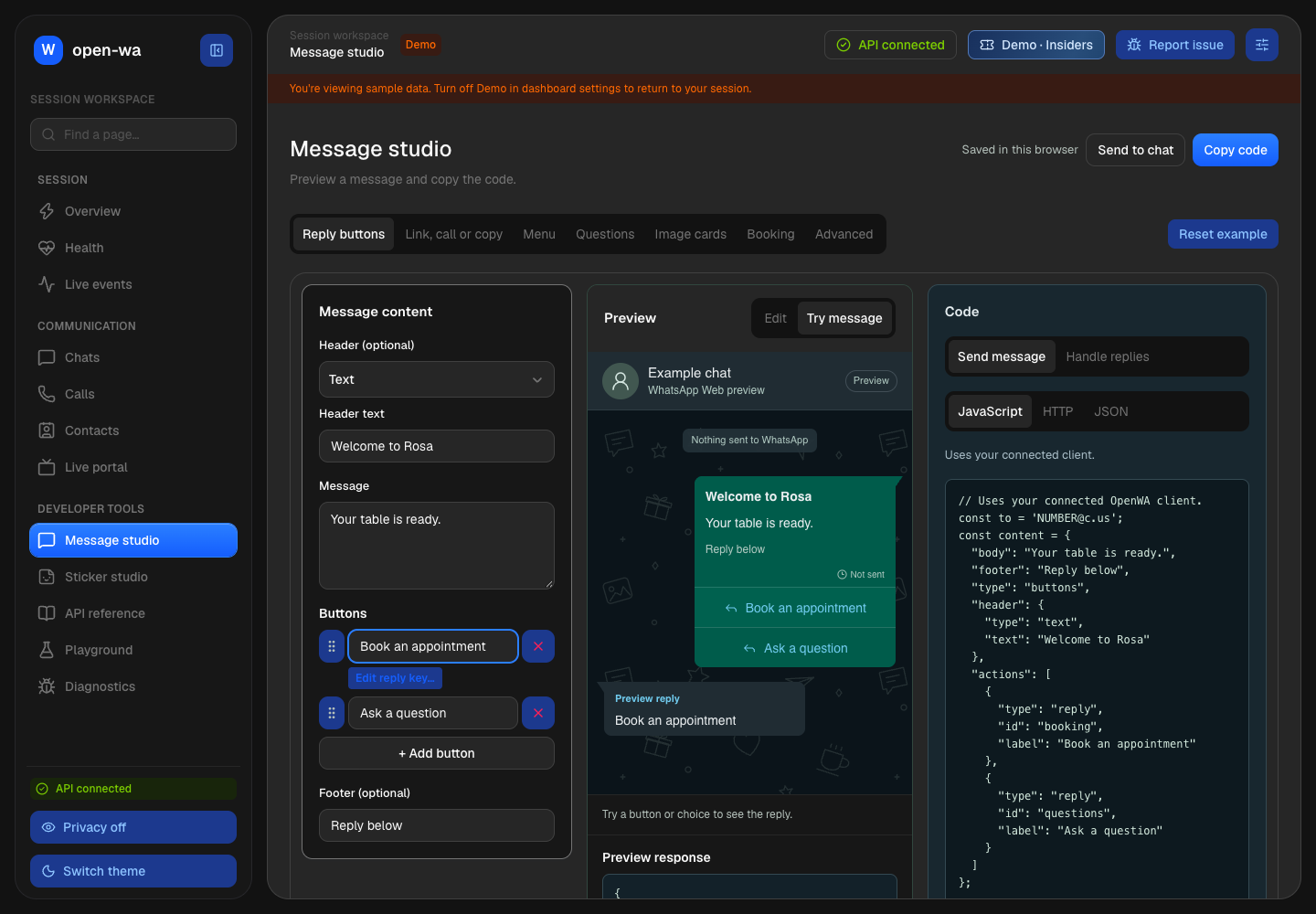
The running Neo dashboard in demo mode. “Try message” simulates a reply locally; this screenshot doesn't show a message sent to WhatsApp.
The studio gives you JavaScript, HTTP and JSON examples, with separate code for handling replies. Copy what you need or download a ZIP with the payload, a send script and an environment-file example. Drafts save in your browser so you can come back to them.
Try message is for experimenting. Send to chat is the separate action that asks for a real recipient, and it is disabled in demo mode. Sending buttons and advanced interactive messages requires Insiders or above and the current runtime patches. The local preview helps you design; the receiving WhatsApp client determines the final presentation.
Make stickers by looking at the effects
The Sticker studio starts with an animated WebP example, so you can see what an effect does before uploading anything. Open the effect chooser to browse 62 effects, search by name, or narrow the gallery to image effects or motion effects. Every tile uses the same cat, making the differences easier to see.
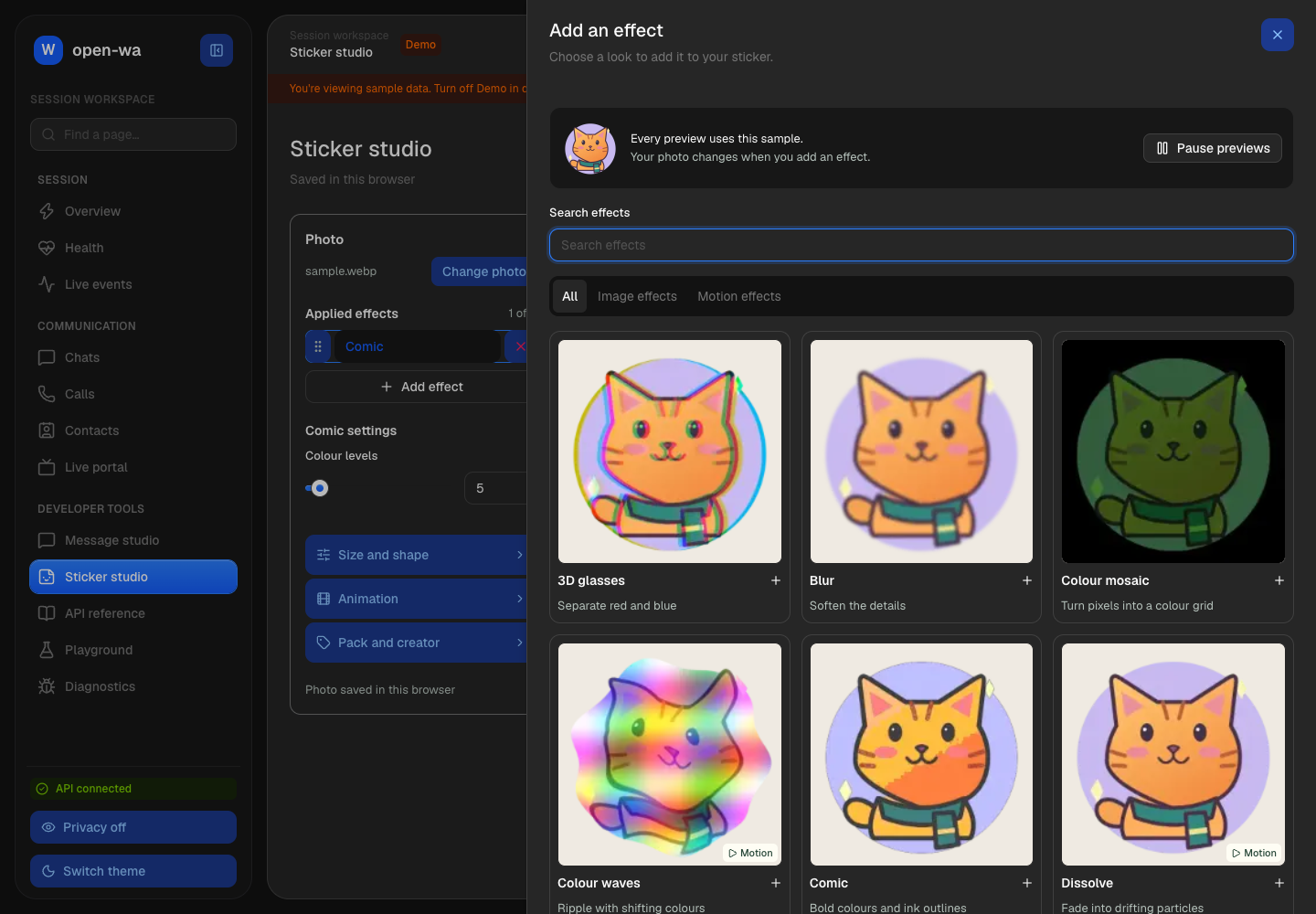
The running effect chooser in demo mode. You can pause the animated previews, and motion effects have a visible label.

Colour waves, shown as an actual animated WebP from the gallery.
Use your own photo, PNG, GIF or WebP, stack up to eight effects, change their order and adjust their settings. Size and shape, background, animation timing, and pack and creator details have their own controls. The preview shows the rendered result, and you can download the WebP or export the source, job settings and code together.
This also comes as @open-wa/stickers for applications and the openwa-sticker command. Rendering happens locally, resources load when needed, and there's no Sharp installation. The SDK uses the connected browser when it supports the whole job, otherwise it renders the whole job in the standalone runtime.
Recent patches made the runtime initialise itself, queue bursts of jobs and release idle renderers. They also fixed browser colour validation and kept the studio preview steady while another render is running. BoardUI controls, clearer labels, direct delete buttons, a simpler mobile editor and visible download controls make both studios easier to use. The gallery's 62 effects were rendered in the browser; the standalone Node runtime still has a known failure in the Low quality effect's JPEG step.
Read about local rendering and its limits.
Calls, invitations and decisions inside a conversation
Audio calls have a licensed preview. There are SDK controls for audio files, live input and recordings, plus a Calls page in the dashboard. Call controls stay available as you move between pages, recipients are easier to find, and the dashboard shows call-end and microphone-recovery information. This is an audio preview; video calling isn't supported.
WhatsApp events and RSVPs let you create, edit and cancel invitations, read attendance and respond to changes in your application. Scheduled-call cards can present RSVP and calendar controls; they don't promise that a call will start automatically.
Poll workflows and message pins give you another way to collect a decision and keep its result visible. You can vote, read results and listen for changes. Some advanced poll options depend on the WhatsApp features enabled for the account.
Events and RSVPs · Polls and pins.
More useful media and repaired message operations
You can now send albums, use typed media options, send view-once media and circular video notes, and work with captions and quoted-message IDs through the options object. Album APIs also cover receiving grouped media, so an application can keep a set of photos together.
We restored patch-backed file and URL sending, message edits, reactions, group/contact results and participant listeners. Delivery listeners retain complete acknowledgement snapshots, giving applications more useful information about a message's progress.
There's also a voluntary phone-number request API for conversations where someone chooses to share their number. The reply flow failed on the devices used during development, so treat that part as experimental rather than a dependable onboarding step.
Media guide · Restored operations and delivery snapshots · Phone-number sharing status.
Start an app more easily and recover a session more clearly
The TypeScript initializer writes an application, its start script and ignore rules, installs matching dependencies, and gives you a first-message example. With Bun installed, the setup is:
bunx --bun @open-wa/wa-automate@5.6.3 init my-botcd my-botEdit the recipient in index.ts to a chat expecting your message, then run bun run start. Scan the QR code from WhatsApp → Linked devices → Link a device. The starter submits one greeting and closes; each run submits another message.
For a dashboard and HTTP API, use Node.js 22.21.1 or later and run:
npx @open-wa/wa-automate@5.6.3 --session-id studio --host 127.0.0.1 --port 8080Pair WhatsApp, then open http://localhost:8080/dashboard/ and choose Message studio or Sticker studio. Keep the terminal running. Browser installation happens on demand and reuses the cache; Chrome and Chromium are available choices, while Lightpanda remains experimental.
Saved authentication now uses a compact encrypted {sessionId}.data.json checkpoint, with options for your own encryption key and local or S3 storage. Keep the file and any custom key private; session payloads, key settings and S3 credentials are redacted from diagnostics. Use the same session ID and key when restoring it; storage alone doesn't make two simultaneous sessions safe.
Pending-message replay also retains messages until handlers acknowledge them. Delivery is at least once, so applications should deduplicate by message ID. sendText now validates its returned message ID and distinguishes known-not-sent failures from uncertain outcomes; check the chat before retrying an uncertain send.
The patches since the comeback email also fix Node/CommonJS startup, recover unusable saved sessions with fresh QR pairing, preserve configured CLI sessions and network settings, expose requested phone link codes, and handle blocked dashboard storage more gracefully. Opening the dashboard from the API server root works again, and request logs now stay quiet unless verbose output is enabled. The dashboard now shows session licensing and lets you prepare a diagnostic issue report for review.
You can refresh runtime patches or apply a license while the API process stays running. WhatsApp reloads during refresh, so messages can be missed while its page is unavailable.
Create a TypeScript app · Easy API setup · Current session format and keys · Refresh a running session.
Connect events to the rest of your application
OpenWA 5.6 gives HTTP integrations a generated AsyncAPI contract at /meta/asyncapi.json, so you can see the actual event envelopes before building a receiver. The SDK's HyperEmitter keeps familiar callbacks and adds optional Effect-scoped listeners, streams and PubSub for applications that want them.
The authenticated MCP endpoint also supports subscriptions to incoming messages, acknowledgements and session state, with verified public HTTPS callbacks and signed deliveries. That gives compatible assistants a way to watch a conversation. It needs a compatible MCP client and callback setup; live ChatGPT delivery hasn't been confirmed end to end. Subscriptions expire, deliveries can repeat or arrive out of order, and events missed while OpenWA is offline aren't replayed.
The documentation has also had a substantial refresh: clearer setup and integration examples, generated method/result and event references, improved search, copyable code tabs, and automatic publication from development and releases.
Event contracts · Effect streams · MCP Events setup.
Your Golden Ticket still works
If you bought an OpenWA license before 29 September 2026, 00:00 UK time, use your original purchase email and license key at v5-promo.openwa.dev to check your ticket.
Eligible customers get 50% off one new OpenWA license, including every renewal of that subscription. Cancelled or expired purchases can qualify. It's one personal code per customer email, refunded/disputed/revoked purchases are excluded, and the offer doesn't change an existing subscription.
The claim page currently prefills a Restricted license. Choose Insiders or above if you want buttons and advanced messages, and review the tier, billing period and discount on Gumroad before paying.
Thanks for coming back and trying what I've been building!
Mohammed ❤️